Talk directly with the OmniCanary team.
Messages go directly to the people who build the platform — no ticket queue in between. We reply within one business day.
 example · anonymised
Join the launch list
Product and availability updates. Not a stream of marketing email.
double opt-in: we send a confirmation email first, unsubscribe any time
How onboarding works.
A short call
We walk through your Webex setup — size, sites, devices, calling — which products fit the work you want to improve, and the timing that works for your team.
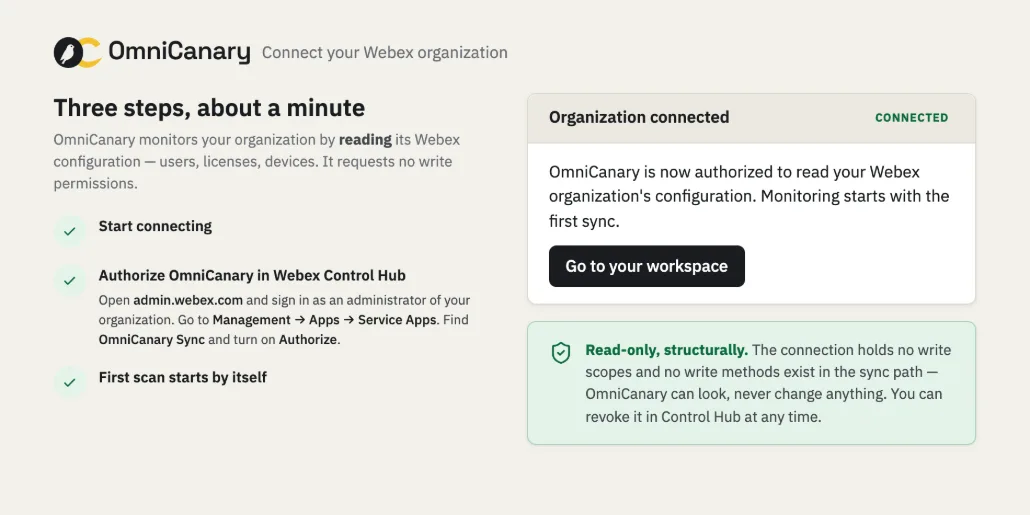
Connect read-only
A Webex administrator authorizes the read-only app in Control Hub. Nothing is installed on user devices. Initial scan time depends on organization size and Webex API response time.
Review the first findings
The first full sync runs with visible progress, Assurance evaluates the checks, and we review the results with your team — including which fixes and automations would help next.
Common questions.
Getting started
5 questionsWhat does OmniCanary need to get started?
One read-only authorization in Control Hub brings up Assurance — the requested scopes are shown before a Webex administrator approves them, and nothing is installed on user devices. Every write-capable or Studio permission is granted separately and knowingly, per product.
Which permissions are requested?
Per product, never as one all-powerful connection: Assurance uses a read-only app whose scopes are shown in Control Hub before authorization. Actions uses a separate write-capable authorization. Studio permissions are stated per builder before an administrator enables them.
Which checks does Assurance run?
The catalog lists the checks, what each one monitors, and any requirements — and administrators build named policies from them, per place and team.
Do we need programmers for Studio?
No — that’s the point. Workflows, room macros, and bots are built from guided blocks on a visual canvas, tested before they ship, and versioned so you can roll back.
Is onboarding open?
Onboarding opens in scheduled waves. Join the launch list for availability updates.
Data & access
5 questionsCan it change anything in our organization?
Assurance cannot — it runs on an app that holds no write permission. Guided fixes in Actions preview the exact change and wait for a named approval over a separately authorized connection. Studio automations run only within rules an authorized administrator has published. Everything lands in the audit trail.
Do automations run without us knowing?
No. Workflows, macros, and bots run only after an authorized administrator publishes their explicit rules, within the scopes those rules were granted — and every run is recorded. Nothing improvises.
Where is data hosted?
In the European Union (Amsterdam), on managed, encrypted infrastructure — encrypted in transit and at rest.
How do we disconnect?
Remove the authorization in Control Hub and notify us. Scheduled access stops, token material is discarded, and deletion follows the published retention schedule. Details are on the Trust and Privacy pages.
How do I report a security issue?
Email support@omnicanary.com with “security” in the subject line and we will prioritize it.
Working with us
3 questionsWhat does it cost?
Priced per organization size and selected products — talk to us and we’ll quote in writing. No automatic renewal or payment collection without a separate agreement.
Will you offer a DPA?
Yes. A data processing agreement and subprocessor list are in place before any customer organization is connected.
Is OmniCanary affiliated with Cisco?
No. OmniCanary is an independent product that complements Webex Control Hub. Webex is a trademark of Cisco Systems, Inc.
About OmniCanary.
OmniCanary is the operations platform for Cisco Webex. It finds configuration problems before users do, fixes them with your approval, and turns repeat administration into no-code workflows, room macros, and bots. OmniCanary is an independent Dutch software company and complements Webex Control Hub.
The platform was born from years of hands-on experience operating and administering Webex estates — and from watching the same configuration problems surface again and again in Control Hub. More on the company page.
Build a calmer Webex operation.
Tell us about your Webex environment and the work you want to improve. Onboarding opens in scheduled waves. Join the launch list for availability updates.