Three products. One platform. Permissions you control.
Start with one read-only connection. Add only the permissions required for the products you choose. Assurance finds the problems, Actions resolves them with your approval, and Studio turns the routine into workflows, room macros, and bots — with Assist keeping your team informed inside Webex.
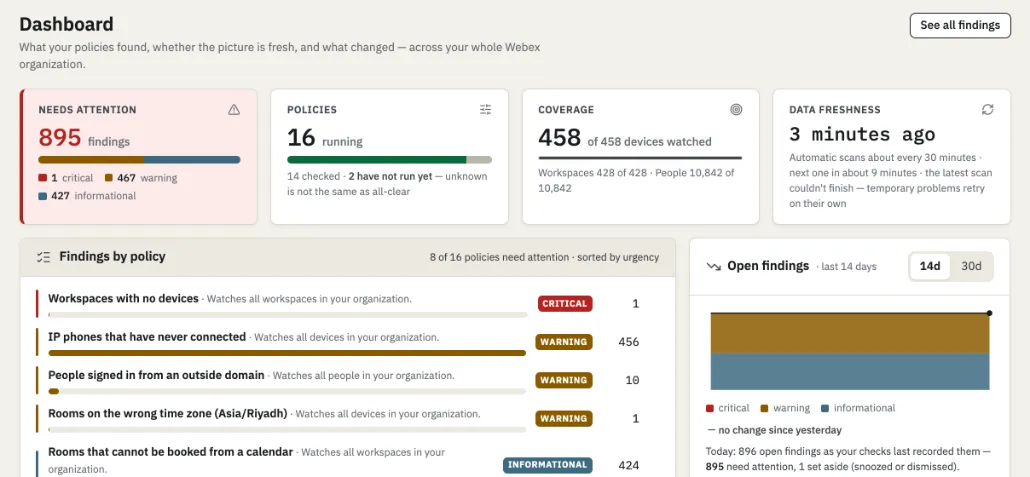 example · anonymised
Join the launch list
Product and availability updates. Not a stream of marketing email.
double opt-in: we send a confirmation email first, unsubscribe any time
Know what needs attention before users feel it.
Assurance checks your users, licenses, workspaces, rooms, devices, and calling setup on a schedule — and turns what it finds into findings anyone can act on.
| What you get | What it means |
|---|---|
| Plain language, always. | Every finding says what happened, why it matters, and what to do next — no decoder ring required. |
| Policies, not just checks. | Build named policies from catalog checks, with different settings for different places: Amsterdam rooms on Amsterdam time, Riyadh rooms on Riyadh time. |
| Honest numbers. | Every count carries the time its data was completed. Unsupported devices are labeled, never counted as healthy. |
| Read-only by architecture. | Assurance runs on an app that holds no write permission at all. |
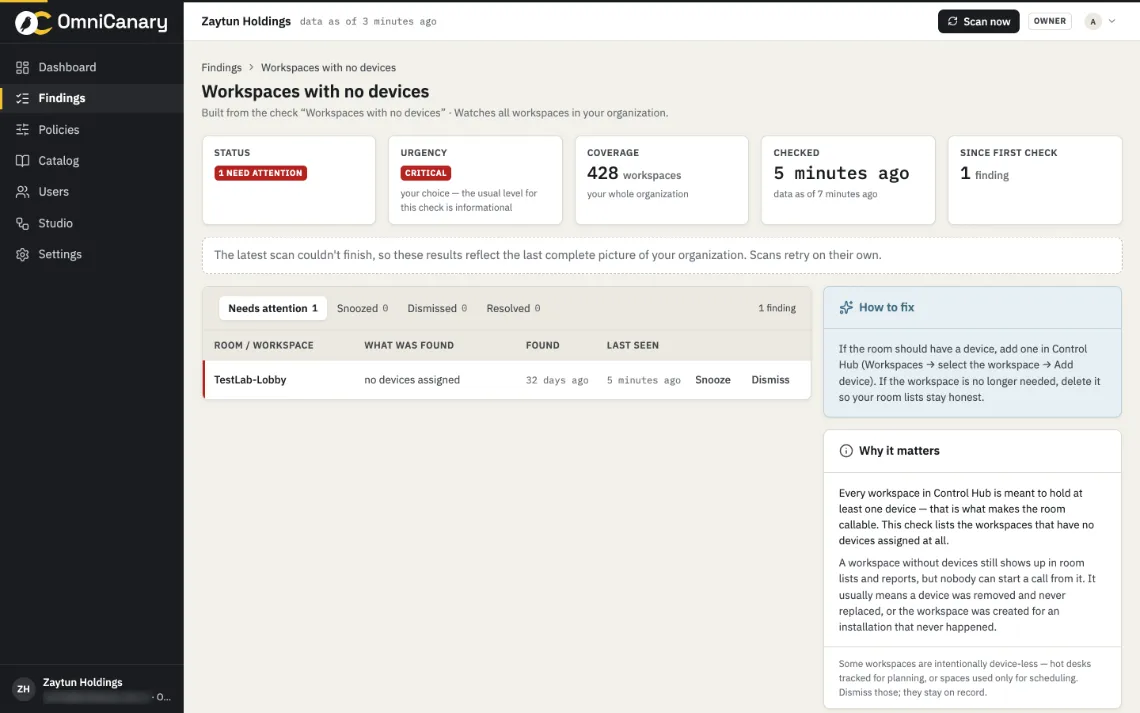 example · anonymised
All three assigned devices are offline in Boardroom
Scheduled meetings may be affected.
12 people have not hosted a meeting in 90 days and still hold a Meetings license
Reclaiming these assignments frees 12 seats.
Temperature unavailable for two rooms
Turn a finding into a controlled action.
12 people hold an unused Meetings license
- previewRelease 12 Meetings licenses. No other setting changes. Each person is listed by name before anything happens.
- approveApproved by M. Janssen · today 09:14.
- applyApplied over the Actions connection — separate from monitoring.
- verifyRe-checked: 12 seats released. Finding closed.
Actions turns findings into one-approval resolutions. It shows exactly what will change, waits for a named yes, applies the change, and verifies the result.
| What you get | What it means |
|---|---|
| Preview first. | Every action lists the exact changes — per person, per device, per setting — before anything runs. |
| Named approvals. | Changes run only after someone with the right role approves. No silent writes, ever. |
| Verified after. | Actions re-checks the result and closes the finding only when reality matches the plan — with honest partial results when a bulk change doesn't fully land. |
| Separate authorization. | Actions uses its own connection, authorized separately from read-only monitoring. |
One no-code workspace. Three builders.
Build the Webex workflows your team needs — without writing code. Everything you create in Studio is versioned, tested before it ships, and runs only after an authorized administrator publishes it.
When something happens, something happens.
Connect triggers, decisions, approvals, and actions on a visual canvas. Build one in minutes; it works around the clock.
workflow builder · example
Every device in a room goes offline
any room in “HQ · Floors
1–4”
During business hours
(08:00–18:00, Mon–Fri)
- Post to the “AV Team” Webex space
- Open a ticket in your service desk
- Re-check in 15 minutes; escalate if still down
Room macros without writing a line of code.
Cisco devices can do remarkable things with macros — if someone writes and maintains the code, room by room. Macro Builder replaces that with guided blocks: pick a trigger, stack the actions, test on one room, deploy to the fleet.
macro builder · exampleTest on one room first
Try every macro on a single room before it goes anywhere near the fleet.
Deploy fleet-wide
Push to the rooms you choose — a floor, a building, or everywhere — in one action.
Versioned, reversible
Every deploy is a version. Something off? Roll the fleet back in one click.
Build Webex bots for alerts, approvals, support, and self-service.
| What you get | What it means |
|---|---|
| No code, real bots. | Compose what the bot listens for and how it responds — from approved components, on the same visual canvas. |
| Its own permissions. | A bot processes only the messages and commands directed to it, in the spaces where it is installed — stated before an administrator enables it. |
| Published, not improvised. | Bots run only after an authorized administrator publishes them; every response is logged. |
Thanks — ticket FAC-1042 created for Room 4.02
The AV team has been notified. I’ll post an update here when the room is checked.
The platform, inside Webex.
Assist is OmniCanary as a member of your Webex spaces — not a bot you build, but the platform keeping you informed. Ask it questions, act on its cards, and get the morning digest where your team already works.
| What you get | What it means |
|---|---|
| Ask anything it watches. | “How is Boardroom?” “Which licenses can we reclaim?” Plain questions, plain answers. |
| Act from chat. | Finding cards carry buttons — view, escalate, snooze, or approve a prepared action. |
| Digests where the team lives. | The morning summary lands in your space: findings, actions awaiting approval, workflows that ran overnight. |
| Same rules as the portal. | Assist respects the same roles, approvals, and audit trail as everything else. |
Boardroom · 3 devices, all offline since 02:31
Ticket AV-218 is already open (workflow “Room down”). Last heartbeat: Room Kit Pro, 02:29.
Morning digest · 07:00
3 new findings · 1 action awaiting approval (12 licenses) · 2 workflows ran overnight. All datasets complete as of 06:00.
Build a calmer Webex operation.
Tell us about your Webex environment and the work you want to improve. Onboarding opens in scheduled waves. Join the launch list for availability updates.