Join the launch list
Product and availability updates. Not a stream of marketing email.
double opt-in: we send a confirmation email first, unsubscribe any time
- 3 products on one platform
- 3 builders in Studio
- 1 read-only connection to start
- 0 write permissions required to start
Three products. One platform. Permissions you control.
Start with one read-only connection. Add only the permissions required for the products you choose — everything happens in one portal, in plain language.
OmniCanary Assurance
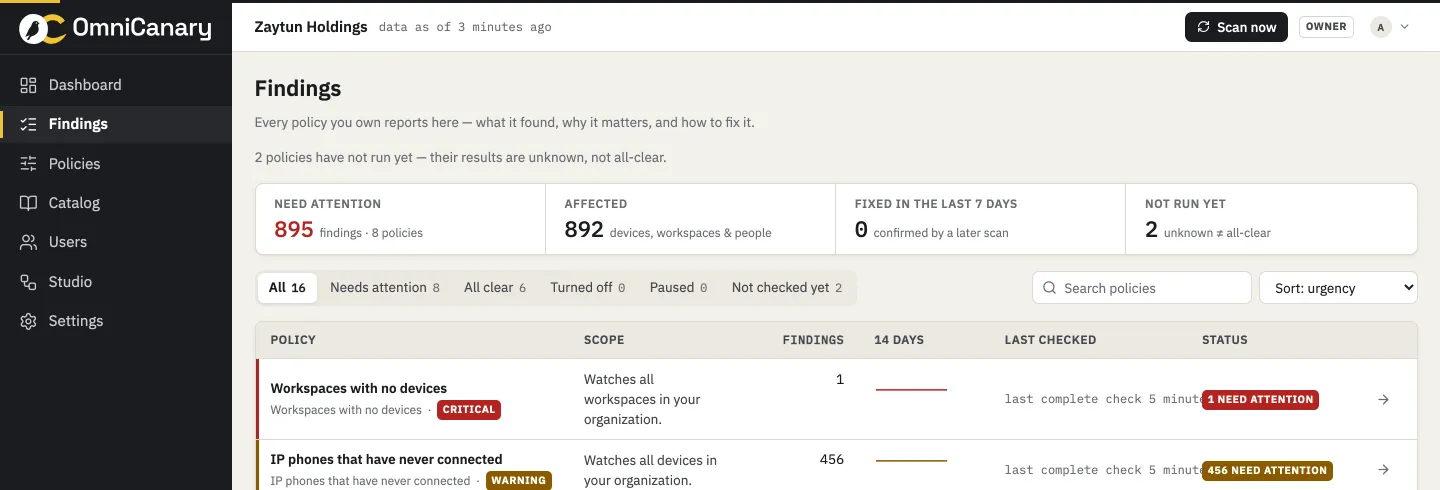
Know what needs attention before users feel it. Scheduled checks across users, licenses, workspaces, rooms, and devices — every finding in plain language, with evidence and freshness. Read-only by architecture.
How Assurance worksOmniCanary Actions
Turn a finding into a controlled action. Preview the exact change, approve by name, apply over a separate authorization, verify the result — with honest partial results and an audit record every time.
How Actions worksOmniCanary Studio
Build the Webex workflows your team needs — without writing code. Three builders in one workspace: Workflow Builder, Macro Builder for RoomOS, and Bot Builder for Webex bots.
How Studio worksAssist
OmniCanary inside your Webex spaces. Morning digests, finding cards with action buttons, chat approvals, and plain answers to plain questions — where your team already works.
How Assist worksBetter together
A finding becomes a fix. A fix becomes a workflow. A workflow runs a macro, and Assist tells you about it in Webex. Each product is useful alone — together they close the loop.
Explore the platformA room goes offline before an executive town hall.
One story, end to end: Assurance detects it, Actions prepares the recovery, a workflow keeps everyone informed — and every step lands in one history.
Executive Boardroom is offline
All three devices unreachable since 02:31. Town hall scheduled at 09:00.
Safe recovery ready for approval
Re-register devices and refresh connections. Exact changes listed; nothing runs without a named yes.
Owner notified, follow-up created
The room owner heard in Webex, ticket AV-218 tracks it, and Assist reports when the room recovers.
 example · anonymised
Connect once. Then let the platform take the routine.
Connect, read-only
A Webex administrator authorizes OmniCanary in minutes. Monitoring needs no write permission, and nothing is installed on user devices.
Assurance finds the issues
Scheduled checks review your whole organization and explain every finding in plain language — what happened, why it matters, what to do next.
Approve the fixes
Guided fixes preview exactly what will change. You approve; Actions applies, verifies, and records who did what, when.
Automate the routine
Turn repeat work into workflows, room macros, and bots in Studio — built visually, scoped to the places you choose, logged completely.
Checks for the problems every Webex estate collects.
A growing catalog across licensing, devices, workspaces, telephony, and security. Administrators build named policies from catalog checks — the same check can run with different settings for different places.
Doubled-up licenses
License combinations your administrator has defined as unnecessary.
Empty workspaces
Workspaces with no assigned device. Review whether they should stay active or bookable.
Silent meeting rooms
Rooms in which every assigned device is offline. Scheduled meetings may be affected.
Phones assigned to inactive people
Phones still assigned to a deleted or inactive user.
Meetings licenses with no hosted-meeting activity
People with a Meetings license who have not hosted a meeting in 90 days.
Phones that never connected
Phones that have never connected to Webex. A wrong MAC address is one possible cause.
Real-world work the platform takes on.
Powerful where you want it. Restrained where it matters.
Read-only by architecture
Assurance runs on an app that holds no write permission — not a setting, a structural boundary. Actions and Studio use their own separate authorizations.
Every change is yours
Guided fixes require a named approval. Automations run only within rules an authorized administrator has reviewed and published. Both leave an audit record.
Isolated and EU-hosted
Each customer’s data lives in its own isolated space, encrypted in transit and at rest, hosted in the EU. Disconnect any time; deletion follows the published schedule.
Build a calmer Webex operation.
Tell us about your Webex environment and the work you want to improve. Onboarding opens in scheduled waves. Join the launch list for availability updates.