Connect once. The platform takes it from there.
A Webex administrator connects OmniCanary read-only in minutes. Assurance reviews your organization on a schedule and explains every finding in plain language. Actions and Studio run under separate authorizations you grant knowingly.
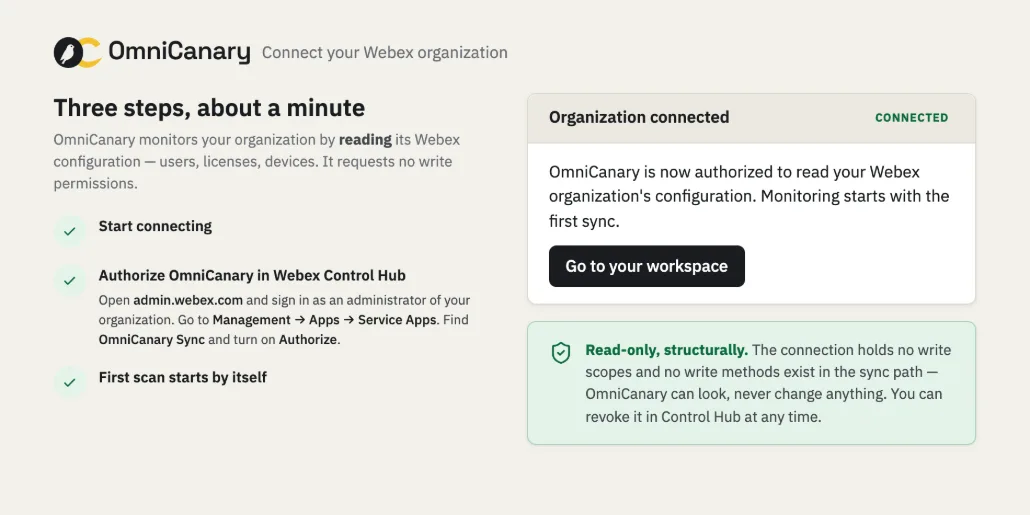 example · anonymised
Join the launch list
Product and availability updates. Not a stream of marketing email.
double opt-in: we send a confirmation email first, unsubscribe any time
From your organization to written findings.
Connect, read-only
A Webex administrator authorizes a separate read-only Webex app. Monitoring needs no write permission, and nothing is installed on user devices.
Assurance finds the issues
OmniCanary keeps the operational information needed for the products you enable and runs the checks available for your organization. Every finding explains what happened, why it matters, and what to do next.
Approve the fixes
Guided fixes in Actions preview exactly what will change and wait for a named approval. Applied, verified, and recorded — with honest partial results.
Automate the routine
Build workflows, room macros, and bots in Studio — visually, without code. They run only after an authorized administrator publishes them.
Read-only monitoring comes first. Everything else is a choice.
Read-only monitoring
Your administrator authorizes the read-only app from Control Hub. The connect wizard waits for Webex’s own confirmation, then runs the first full sync with visible progress. Findings appear after every required dataset completes.
Actions and Studio, separately authorized
Actions and Studio run under separate authorizations you grant knowingly — per product, stated before an administrator enables them. Guided fixes follow preview, named approval, apply, verify. Automations run only within published rules.
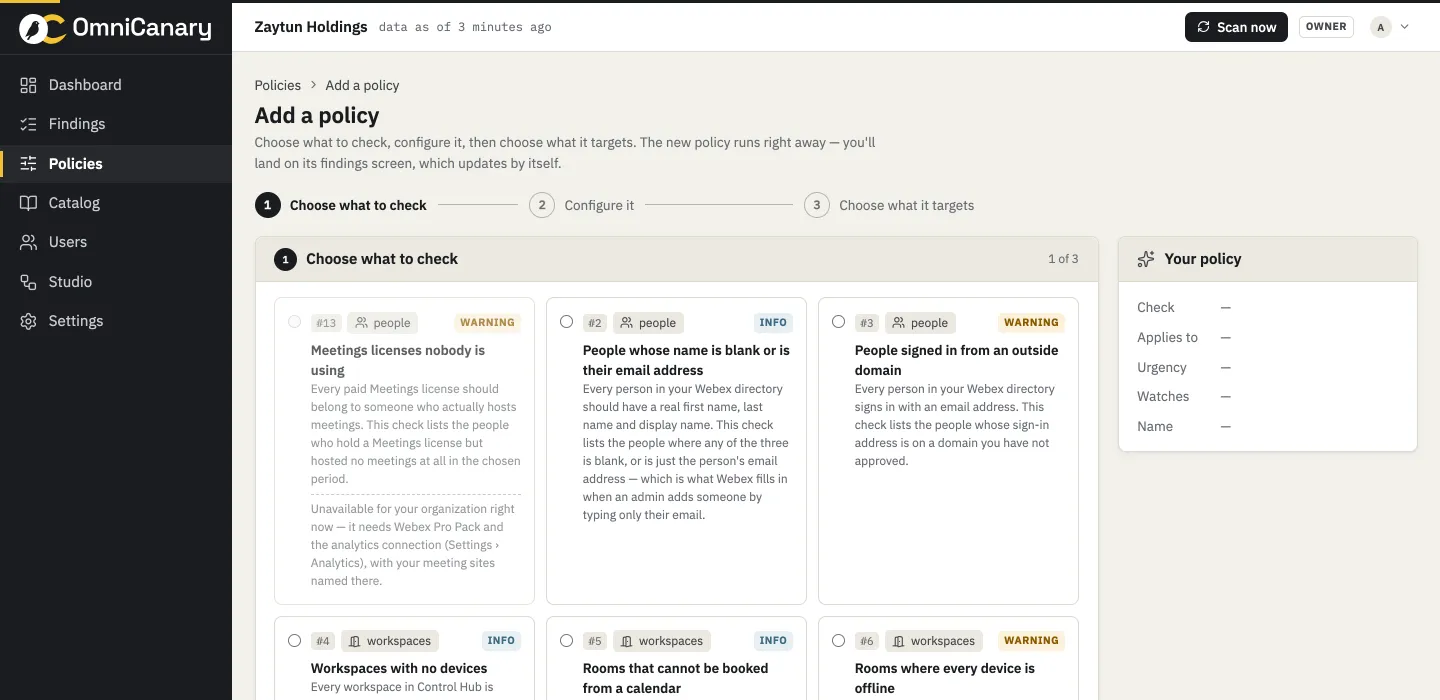 example · anonymised
Checked around the clock, honest about freshness.
Check frequency adapts to your organization’s size. The portal always shows when each dataset was last completed — every count on every screen carries the time its data was checked.
- 02:00directory re-checked · 10,842 peoplecomplete
- 02:31device check · 456 devices3 offline
- 02:31workflow “Room down” → ticket AV-218 + AV-team spaceran
- 06:00every check evaluatedcomplete
- 07:00Assist posted the morning digest · 3 findings
Example scenario · not a customer result.
How OmniCanary handles incomplete data.
Complete data resolves findings
A finding is resolved only after a complete check of every dataset it depends on.
Unsupported devices
Unsupported devices are labeled Unsupported. They are not counted as healthy.
Freshness on every number
Every count shows when its source data was last completed. Stale coverage is labeled.
Build a calmer Webex operation.
Tell us about your Webex environment and the work you want to improve. Onboarding opens in scheduled waves. Join the launch list for availability updates.